

When anyone can create anything, brand is what's left
AI has made it easy for everyone to create. A salesperson can build a deck in minutes. A social media manager can produce a week of visuals before lunch. An engineer can ship a new feature without anyone opening Figma.
That's great news for speed. It's bad news for coherence.
When everybody can create, everybody does. And if we don't give AI the right framework and guardrails for the brand, it will create slop, quickly and confidently, at a scale no designer can keep up with. You can't polish your way out of that. There are simply too many assets.
Speed goes up. Coherence goes down. That's the trade most companies are making right now without noticing.
Why brand guides and templates aren't enough on their own
This problem isn't new. AI just makes it bigger.
You can build any brand you want and write the most beautiful brand guidelines. But in the end, it's up to each person to apply them. If they don't, everything falls apart.
You can make the perfect PowerPoint or Google Slides template. But if the people building decks don't pick the right layout for each slide, the presentation still doesn't look on brand. That's why so many designers spend their days polishing decks someone else made, which is mostly a waste of everyone's time.
People don't follow templates. They take the easy way. That's not a criticism - it's just how people work when they're busy.
AI is different. AI follows instructions. So in theory, AI should produce more on-brand work than people ever did. The real question is: which instructions does it get?
Anyone can prompt an AI, and the AI will always deliver something. But is that something on brand, or is it just random output in the right colours and the right font?
Right colours, right font, still off brand
Are the right colours and the right font enough to make something on brand? As a designer and Head of Design, my answer is: absolutely not.
A brand isn't just the colour palette. It's also the typography, the layouts, the logo, the icons, the imagery, the positioning: all the elements that make up a company's visual identity. And that visual identity isn't a standalone thing. It's the visual expression of the brand's values, mission and character, and what it wants to say. It's what makes the company recognisable to the people it's trying to reach.
I've seen this many times in my own tests. The colours are right. The background image is right. The fonts are technically correct. But the typography is a mess, layouts are reinvented every time and the slide looks like someone kept adding things to it until it was full.

That's what "technically on brand" looks like. Every ingredient is right, and the result still isn't.
What design infrastructure is
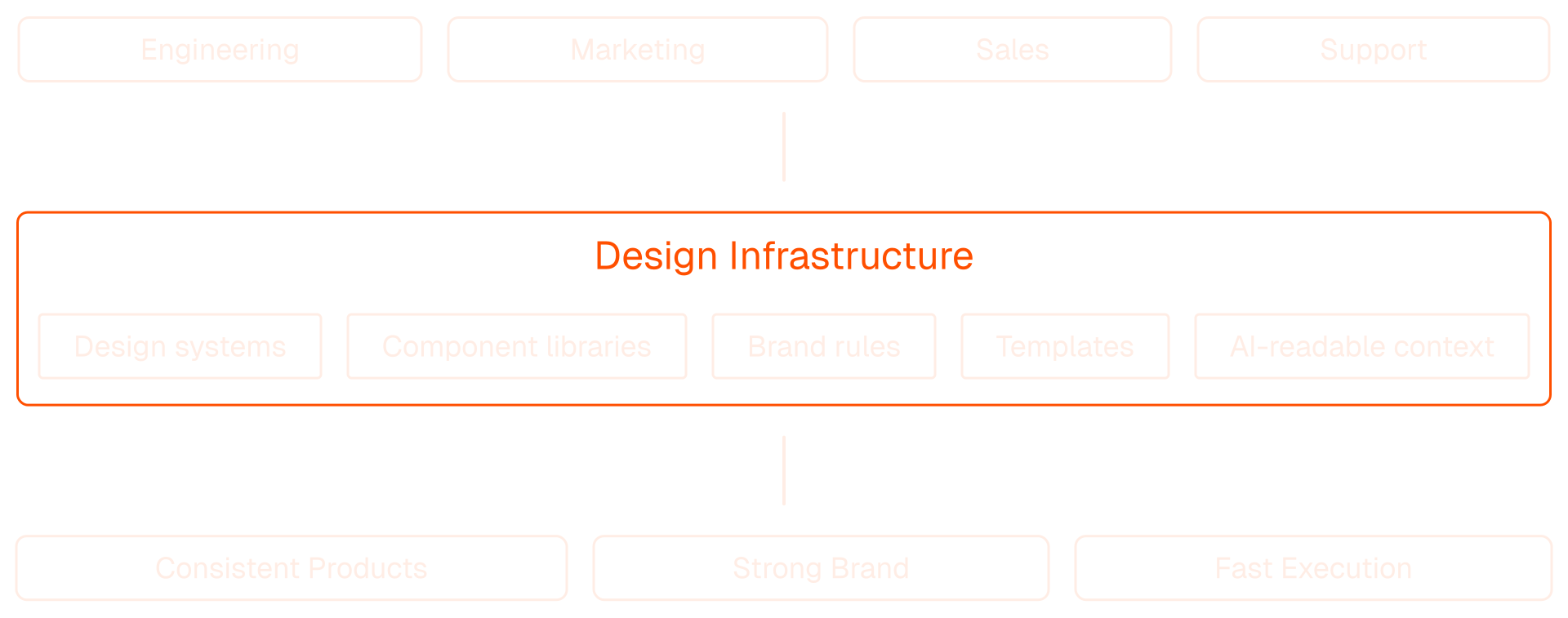
Design infrastructure is the layer between your brand foundations and the teams producing assets with that brand.
Those teams are everyone who makes something an external person will see: marketing, sales, engineering, customer support. Design infrastructure makes sure the AI tools they use every day produce work that's actually on brand, not just in the right colours.
That covers anything a team makes with AI: product screens, social posts, documents and decks. I use decks as the main example in this post because almost every company makes them, but the idea works the same way everywhere.
It has two main parts.
1. Templates the AI can work with. These are the files the AI uses to create new assets: Google Slides, Docs or Sheets, Figma files, or whatever your teams already use. Each tool can be automated more or less by AI in its own way, but the direction is clear. Sooner or later, all of them will be fully accessible to AI.
2. Brand guidelines written for AI. Most companies have brand guidelines written for people. They explain font use, colour use, logo use, what kind of photography to use and what's forbidden. Some include sample layouts for a print ad or a banner, or minimum logo sizes.
For an AI, that isn't nearly enough. Guidelines for an LLM need to be much more specific. They end up looking less like a brand book and more like a product design system.
A real design system isn't just a UI kit with components, fonts and colours. It also holds the rules: how elements combine, how to choose one option over another, how many accents can appear on one screen. Brand guidelines for AI need exactly that kind of rule. Not only what the brand looks like, but how to make decisions with it.
Why not just buy a new AI tool?
Since late 2022, a new AI tool appears every few days. Every few weeks, one replaces another, and each claims to be the best. No person can keep up with that. You can't master a tool in two weeks and then start over with the next one.
If you're a one-person business, you can switch tools every month. You cancel one subscription, start another, and decide on the spot what's on brand. There's no procurement and no one to convince.
A company with a few thousand people can't do that. Rolling out even a well-known tool takes months: procurement, vendor requirements, implementation, training. Nobody moves thousands of people's decks and documents into a new AI presentation app overnight, along with every template, shared file and approval flow. And most of those apps still treat a brand as a logo, a palette and two fonts. And you can't make an informed switch anyway, because there's no time to test everything properly.
So the better question isn't which new tool to buy. It's how to get the benefit of AI on the stack you already have. Design infrastructure works that way. It lives in your existing templates and tools, so it doesn't lock you into any vendor, and it keeps working when the next model or tool comes along.
Whatever tools you use, one thing stays the same: a human stays accountable and has the final say on what is and isn't okay.
How it started
I first built this at Lenses.io, where I was the only designer working with around 15 engineers on the product. There was no way for one person to design everything in Figma for that many people.
We already had a proper design system, implemented in the product. Engineers were starting to build with AI coding tools like Cursor and VS Code, and the results drifted: deviations from the design system and odd visual solutions. It was a problem at every level.
So I translated the design system, with its components and rules, into a format the AI tools could use. The first tests were very promising. Then I translated the rest, and the engineers started building new features on the fly, on brand. You have an idea, you ask your coding tool to build it, and you test it live, even with users. There's no step in between for prototyping in Figma.
While I was doing this, I also wrote a pitch for the bigger idea and gave it a name, the Design OS: one system feeding engineering, marketing and sales, built from design systems, component libraries, brand rules, templates and AI-readable context.
The next step was decks. I tried to automate on-brand Google Slides with Claude and ChatGPT, but there were no connectors for Google Drive or Slides yet. I worked around it with custom scripts and PowerPoint exports, and it wasn't good enough. But it was the first step, and it led to the tests I'll share in my next post.
What changes for designers
I don't see designers becoming unnecessary any time soon. Just the opposite. Hiring is slow right now and a lot of designers are worried, but I believe they'll stay just as important. Their work will shift.
Instead of moving rectangles around, designers will be more focused on creating concepts, and on orchestrating and leading the AI agents that do the execution. They'll still make the first visual version of an idea, with AI tools or traditional ones - that part doesn't matter. What's new is the end of the job: translating those layouts, rules and design systems into a form an AI can follow. Call it documentation if you like. It's the step that makes design infrastructure actually work.
Someone has to own it. A product design system is usually maintained by a small team, often a developer, a UI designer and a UX designer, whose main job is to develop it, polish it and keep it up to date. Every change is documented there, because the design system is the source of truth.
Design infrastructure needs the same. It belongs to the brand team, whether that's one person or ten. Keeping it working is one of their core tasks. And because AI takes over most of the execution, designers get their time back for the creative problems that actually need them.
How to measure it
The north star metric is simple: the percentage of the company's output created through the design infrastructure. The higher it is, the more the company can scale without losing coherence.
In practice, it looks like this:
- A salesperson creates 15 decks for 15 prospects this month, all on brand. They needed a designer twice, for a custom illustration and a diagram.
- A social media manager creates 22 visuals for posts. They asked a designer for help three times, for special occasions like Halloween.
Each team counts what it created and how often it needed a designer. That ratio tells you how well the infrastructure is working, and where it needs more work.
Where to start
Test the AI tools yourself. Many vendors promise always-on-brand output, with shiny demos and nice videos. The reality is quite different.
Try them on your own brand and your own templates. See what they produce, what goes wrong, and which problems you can see but don't know how to solve.
Decks are the easiest place to test this, because almost every team makes them. Ask a few people across your company to build decks with AI, using the templates you have today. Put the results side by side and watch how everything drifts, especially visually. Slides that should come from the same template look different every time, because the AI picks a new solution each run. And even when it picks the same solution, it draws it in a different way.
That's exactly what I've been doing with Claude and ChatGPT on Google Slides. In my next post, I'll share the results: same prompt, two templates, very different outcomes. One spoiler: with the LLM-ready template and its instructions, Claude and ChatGPT each produced on-brand decks independently, and the two came out almost identical. Only the wording differed.
The faster AI lets us move, the more design infrastructure matters. The goal is simple: make it easy for every team to create, and almost impossible to go off brand.
If you're running into these problems and want to talk them through, let's get in touch